Japanese
B
A
S
I
C
Decimal BASIC for Linux (Intel)
We provide with an ISO Full BASIC language system that works on Gnu/Linux (x86).
This program implements almost all of the core module and the graphics module of ISO Full BASIC.
It has not been conformed with the standard, whereas there are very few differences.
All graphics commands prescribed in ANSI Full BASIC are implemented with slight incompatibility on behavior.
Most part of the modules module and the individual character input module for Full BASIC are implemented, too.
This page deals with Intel x86_64 or AMD64 based Linux.
For ARM based linux, use BASIC Generic.
Notice.
Do not confuze AMD64 with ARM64.
Decimal BASIC for Linux(x86_64) ver. 8.1.6.3 (64bit GTK2 Edition)
Download BASIC8163En_Linux64.tar.xz.
Gtk2 version requres gtk2. If basic does not launch, install gtk2.
In Fedora 41, type in the terminal
sudo dnf install gtk2
In Manjaro Linux Gnome, Type in the terminal
sudo pacman -S gtk2
For Ubuntu 26.04,
sudo apt install libgtk2.0-common
Trouble Shooting
Start a terminal in the folder where basic is located and run
./basic
This may give you some information.
Known faults.
Gtk2 version do not perform clipping for printer.
Decimal BASIC for Linux(x86_64) ver. 8.1.6.3 (64bit Qt5 Edition)
Download BASIC8163En_Linux64_Qt5.tar.xz .
Qt5 vesion requires Qt5Pas library.
To install Qt5Pas
do on the terminal
sudo dnf install qt5pas
on Fedora, or rpm based distributions.
do on the terminal
sudo apt install libqt5pas1
on Ubuntu, or deb based ditributions.
To launch BASIC, type on the terminal
cd BASIC81En
./basic --platform xcb
Trouble shooting
If it does not start or there is a problem, right-click in the BASICEn folder and select "Open in Terminal" or "Open in Console" to open a terminal and start it from the terminal with
./basic
and check the error message.
(1) undefined reference to `QGuiApplication_setFallbackSessionManagementEnabled'
or … undefined symbol: QPrinterInfo_availablePrinterNames
This may occur in Debian 12.
Get the latest version of Qt5Pas.
The latest version of Qt5Pas seems to be V1.2.16 in
davidbannon libqt5pas .
Click on “Show all 22 assets” in assets to find it.
The required Qt5pas library and installation method are the same as the Qt6 version below.
In the downloaded folder, run the following command from a terminal:
sudo apt install ./libqt5pas1_2.16-4_amd64.deb ( Ubuntu, Linux Mint, etc. Debian-based )
sudo dnf install ./libqt5pas-2.16-4.x86_64.rpm (Fedora, etc. RedHat-based )
(2) error while loading shared libraries: libQt5Pas.so.1: …
The Qt5Pas library is not installed properly.
(3) QSocketNotifier: Can only be used with threads started with QThread
In this case, run
./basic --platform xcb
from a terminal .
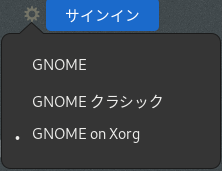
Or, when logging in, if a gear icon  appears in the bottom right corner when entering the user name, select the side that includes “on Xorg”.
See.
Free Pasacal Wiki Qt5_interface Systems using Wayland
To register BASIC with Linux lancher, see Register Decimal BASIC with Linux launcher.
Known fault
In Fedora41, Ubuntu24.04, etc., the graphics window, debug window, etc. are not output in the specified position in case launched without "--platform xcb".
Decimal BASIC 8.1.6.3 (x86_64) Qt6 
Download BASIC8163En_Linux64_Qt6.tar.xz
Install Qt6PAS
On the terminal, type
sudo dnf install qt6pas on Fedora,
sudo apt install libqt6pas6 on Ubuntu,
sudo pacman -S qt6pas on Manjaro Linux (Xfce, Gnome) .
Otherwise,download the file needed for executing following,
Download LibQt6Pas Pre-Built Packages Assets,
Type on the terminal
on Ubuntu or Debian based distributins,
sudo apt install ./libqt6pas6_6.2.10-1_amd64.deb
on Fedora or RedHat based distributions,
sudo dnf linstall ./libqt6pas6-6.2.10-1.x86_64.rpm
(numerals 6.2.10-1 may be alterd in future).
To launch BASIC, type on the terminal
cd BASICEn
./basic --platform xcb
Known Fault
Graphics window or text window appears incorrect position, and they may hide behind existing windows in Fedora41, Ubuntu24.04 and so on, in case launched without "--platform xcb".
Decimal BASIC 8.1.6.3 (x86) 32-bit gtk2 edition
Download Linux 32 bit version
BASIC8163En.tar.gz
Workaround
Debug window can be minimized or maximized
You may be able to minimize the debug window.
If you select Cancel(Esc) on the dialog in that state, you will not be able to exit.
You need to find the minimized icon and display the dialog.
Measures such as updating the OS, stopping Wayland and running it on X11 may be effective, but if they are not effective,
BASIC0772En_Linux64_Qt5.tar.xz can be used for emergency. A separate installation of the Qt5Pas library is required.
Comparison between GTK2 editon and Qt5 edition
○ Working. × Imperfection.
(tested on Fedora 41, Ubuntu 24.04)
| Destination | Screen | Printer (cups-pdf)
Confirmed on Windows with Adbe Acrobat Reader. |
| Edition | GTK2 | Qt5 | Qt6 | GTK2 | Qt5 | Qt6 |
| Clipping | 〇 | 〇 | 〇 | × | 〇 | 〇 |
| LINE STYLE | 〇 | 〇 | 〇 | 〇 | 〇 | 〇 |
| AREA STYLE | 〇 | 〇 | 〇 | × | 〇 | 〇 |
| LINE WIDTH | 〇 | 〇 | 〇 | 〇 | 〇 | 〇 |
| TEXT BACKGROUND | 〇 | 〇 | 〇 | ×(always tranparent) | ×(always opaque) | ×(always opaque) |
| DRAW MODE MASK | 〇 | 〇 | 〇 | × | × | × |
Notice that PDF readers equipped on Linux OSs may not display correctly. |
|
<Note.>
To install cups-pdf, a printer driver which generates PDF files,
on Fedora 41,
sudo dnf install cups-pdf
on Ubuntu 24.04
sudo apt install printer-driver-cups-pdf
- Change log
- Ver. 8.1.6.3
-
BASIC8163En.tar.gz (x86)GTK2 (32 bit)
BASIC8163En_Linux64.tar.xz (x86_64)GTK2
BASIC8163En_Linux64_Qt5.tar.xz (x86_64)Qt5
BASIC8163En_Linux64_Qt6.tar.xz (x86_64)Qt6
-
Fixed an issue where the accuracy of the MOD function was insufficient in binary and complex modes.
- Ver. 8.1.6.2
-
BASIC8162En.tar.gz (x86)GTK2 (32 bit)
BASIC8162En_Linux64.tar.xz (x86_64)GTK2
BASIC8162En_Linux64_Qt5.tar.xz (x86_64)Qt5
BASIC8162En_Linux64_Qt6.tar.xz (x86_64)Qt6
-
Fixed an issue where the previous drawing might not complete before the GET POINT statement was executed.
Fixed an issue where trigonometric functions would take abnormal values if the absolute value of the argument was 2^63 or greater in binary and complex modes.
- Ver. 8.1.6.1
-
BASIC8161En_Linux64.tar.xz (x86_64)GTK2
BASIC8161En_Linux64_Qt5.tar.xz (x86_64)Qt5
BASIC8161En_Linux64_Qt6.tar.xz (x86_64)Qt6
-
Shared librraries opened with dlopen have been changed not to close with dlclose on disposing ASSIGN statements.
Numerical functions defined using the ASSIGN statement in a 64-bit environment have been changed to assume that the DLL output is 64-bit .
- Ver. 8.1.6.0
-
BASIC8160En.tar.gz (x86)GTK2 (32 bit)
BASIC8160En_Linux64.tar.xz (x86_64)GTK2
BASIC8160En_Linux64_Qt5.tar.xz (x86_64)Qt5
BASIC8160En_Linux64_Qt6.tar.xz (x86_64)Qt6
- Transcendental Supplied functions such as SIN, COS, EXP, LOG, and so on and decimal exponents are implemented on the decimal 1000-digit mode.
- Ver. 8.1.5.4
- Fixed the bug that modification on Ver. 8.1.3.5 was invalidated.
- Ver. 8.1.5.3
- Improved debug facility.
- Ver. 8.1.5.2
- Fixed the bug that the editor's Replace command may cause BASIC to freeze.
- Ver. 8.1.5.1
- Fixed the fault that continual replaces on the Replace Dialog caused freezing.
Added facility to handling matrix rows and columns .
- Ver. 8.1.4.7
- Gutters of SynEdit was set to not Visible.
Added support for CallBack procedures.
-
- Ver. 8.1.4.5
- Added support for callback functions on DLLs.
- Ver. 8.1.4.2
- Fixed the bug MAT WRITE did not work properly on RECTYPE CSV.
- Ver. 8.1.4.1
- Fixed the fault Breaking a running program might let it freeze.
- Ver. 8.1.3.8
- DRAW GRID, et al. be traslated as a built-in picture.
- Ver. 8.1.3.7
- Countermeasure for Qt5 and Qt6, where some graphics commands might not be affected with clipping.
- Ver, 8.1.3.6
- FIxed the fault Qt6 manipulation lacked.
- Ver. 8.1.3.5
- Fixed the fault that some Linux such as Debian, Ubuntu and Linux Mint allows the debug window to minimize.
- Ver. 8.1.3.4
- Fixed the bug that DIRECTORY GETNAME teminated basic abnormally.
- Ver. 8.1.3.3
- Corrected the translation of the PLOT statement (for more accurate error messages).
- External procedures that do not have OPTION ARITHMETIC inherit the settings of the main program (changed to JIS incompatibility).
- Ver. 8.1.3.2
- Add measures for Ubuntu 24.04 or Fedra 41.
Removed the compatibility option “TEXT Figure”.
- Ver. 8.1.3.1
-
Measures taken against troubles on Ubuntu 24.04 or Fedra 41.
- Ver. 8.1.3.0
-
PLOT TEXT statments was modified to draw text in physical coordinates.
Initial beam mode was made to be "IMMORTAL".
The above two introduces incompatible with Full BASIC standard, and option menu which brings back was added.
- Ver. 8.1.2.6
- Revised the syntax of constants that can be written without quotation marks in DATA statements.
- Ver. 8.1.0.5
- Fixed the bug Help search cannot act accurately when the program contains multi-byte characters.
- Ver. 8.1.0.4
- Help reviced
- Compiled with Lazarus 2.0.8
- Ver. 8.1.0.3
- Fixed the bug that the graphics pane might not be erased before next program ran.
- Fixed the bug the font size for graphics might be irregular.
- Fixed the fault that INPUT dialog might cause an error on Qt5.
- Fixed the fault saving a program might cause an error , probably on the versions compiled with Lazarus 1.6.4.
- Ver. 8.1.0.2
- Set graphics coodinate system 16 bit for Linux, and 32 bit for Mac.
On printer graphics mode, SET BITMAP SIZE made execution prohibited.
On printer graphics mode, SET TEXT BACKGROUND shall be ignored.
The default font for printer shall be identical to that for screen.
On Graphics Option Dialog, sellection and setteing of the printer enabled.
- Ver.8.1.0.1
- Fixed the bug that the Help button in the Graphics option dailog failed to work.
- Ver. 8.1.0.0
- Added printer graphics.
- Ver. 8.0.1.3
- Improved the accuracy of COS functrion.
Fixed the fault READ IF MISSING did not work when the number of data is incomplete.
- Ver. 8.0.1.2
- Fixed the fault on PROBLEX and PLOBLEMY functions.
- Ver. 8.0.1.1
- Fixed the bug CHAIN statements did not recognize capital ".BAS" as a BASIC extension.
Fixed the bug Undo on the Edit menu did not work.
Inproved the precision of WAIT DELAY.
- Ver. 8.0.1
- Fixed the bug that Cancel on the INPUT dialog caused to hang up.
- Ver. 8.0.0
- Calculation and Drawing are separated into two threads.
Known Faults
(1) SET DRAW MODE (MASK, ..) works unstably.
(2) MOUSE POLL has a slight fault.
(3) Continual use of LOCATE VALUE makes break unavailable.
Part of help files and sample programs are remaining not translated, written in Japanese.
See
Help for Windows edition, more part of which may have been translated.
Decimal BASIC main page (Windows version available)